Bitwise AND, OR, XOR and NOT

void bitwise_and(InputArray src1, InputArray src2, OutputArray dst, InputArray mask=noArray())
Calculates the per-element bit-wise conjunction of two arrays or an array and a scalar.
Parameters:
  • src1 – first input array or a scalar.
  • src2 – second input array or a scalar.
  • src – single input array.
  • value – scalar value.
  • dst – output array that has the same size and type as the input arrays.
  • mask – optional operation mask, 8-bit single channel array, that specifies elements of the output array to be changed.
The function calculates the per-element bit-wise logical conjunction for:
  • Two arrays when src1 and src2 have the same size:
    \texttt{dst} (I) =  \texttt{src1} (I)  \wedge \texttt{src2} (I) \quad \texttt{if mask} (I) \ne0
  • An array and a scalar when src2 is constructed from Scalar or has the same number of elements as src1.channels():
    \texttt{dst} (I) =  \texttt{src1} (I)  \wedge \texttt{src2} \quad \texttt{if mask} (I) \ne0
  • A scalar and an array when src1 is constructed from Scalar or has the same number of elements as src2.channels():
    \texttt{dst} (I) =  \texttt{src1}  \wedge \texttt{src2} (I) \quad \texttt{if mask} (I) \ne0
void bitwise_not(InputArray src, OutputArray dst, InputArray mask=noArray())
Inverts every bit of an array.
void bitwise_or(InputArray src1, InputArray src2, OutputArray dst, InputArray mask=noArray())
Calculates the per-element bit-wise disjunction of two arrays or an array and a scalar.
void bitwise_xor(InputArray src1, InputArray src2, OutputArray dst, InputArray mask=noArray())
Calculates the per-element bit-wise “exclusive or” operation on two arrays or an array and a scalar.

Example:

-----------
#include "opencv2/highgui/highgui.hpp"
#include "opencv2/imgproc/imgproc.hpp"

using namespace cv;
using namespace std;

int main(  )
{
    Mat drawing1 = Mat::zeros( Size(400,200), CV_8UC1 );
    Mat drawing2 = Mat::zeros( Size(400,200), CV_8UC1 );

    drawing1(Range(0,drawing1.rows),Range(0,drawing1.cols/2))=255; imshow("drawing1",drawing1);
    drawing2(Range(100,150),Range(150,350))=255; imshow("drawing2",drawing2);

    Mat res;
    bitwise_and(drawing1,drawing2,res);     imshow("AND",res);
    bitwise_or(drawing1,drawing2,res);      imshow("OR",res);
    bitwise_xor(drawing1,drawing2,res);     imshow("XOR",res);
    bitwise_not(drawing1,res);              imshow("NOT",res);


    waitKey(0);
    return(0);
}
-----------

 Result:


Histogram Calculation

void calcHist(const Mat* images, int nimages, const int* channels, InputArray mask, OutputArray hist, int dims, const int* histSize, const float** ranges, bool uniform=true, bool accumulate=false )
Calculates a histogram of a set of arrays.
Parameters:
  • images – Source arrays. They all should have the same depth, CV_8U or CV_32F , and the same size. Each of them can have an arbitrary number of channels.
  • nimages – Number of source images.
  • channels – List of the dims channels used to compute the histogram. The first array channels are numerated from 0 to images[0].channels()-1 , the second array channels are counted from images[0].channels() to images[0].channels() + images[1].channels()-1, and so on.
  • mask – Optional mask. If the matrix is not empty, it must be an 8-bit array of the same size as images[i] . The non-zero mask elements mark the array elements counted in the histogram.
  • hist – Output histogram, which is a dense or sparse dims -dimensional array.
  • dims – Histogram dimensionality that must be positive and not greater than CV_MAX_DIMS (equal to 32 in the current OpenCV version).
  • histSize – Array of histogram sizes in each dimension.
  • ranges – Array of the dims arrays of the histogram bin boundaries in each dimension. When the histogram is uniform ( uniform =true), then for each dimension i it is enough to specify the lower (inclusive) boundary L_0 of the 0-th histogram bin and the upper (exclusive) boundary U_{\texttt{histSize}[i]-1} for the last histogram bin histSize[i]-1 . That is, in case of a uniform histogram each of ranges[i] is an array of 2 elements. When the histogram is not uniform ( uniform=false ), then each of ranges[i] contains histSize[i]+1 elements: L_0, U_0=L_1, U_1=L_2, ..., U_{\texttt{histSize[i]}-2}=L_{\texttt{histSize[i]}-1}, U_{\texttt{histSize[i]}-1} . The array elements, that are not between L_0 and U_{\texttt{histSize[i]}-1} , are not counted in the histogram.
  • uniform – Flag indicating whether the histogram is uniform or not (see above).
  • accumulate – Accumulation flag. If it is set, the histogram is not cleared in the beginning when it is allocated. This feature enables you to compute a single histogram from several sets of arrays, or to update the histogram in time.
void normalize(InputArray src, OutputArray dst, double alpha=1, double beta=0, int norm_type=NORM_L2, int dtype=-1, InputArray mask=noArray() )
                           (or)
void normalize(const SparseMat& src, SparseMat& dst, double alpha, int normType)
Normalizes the norm or value range of an array.
 Parameters:
  • src – input array.
  • dst – output array of the same size as src .
  • alpha – norm value to normalize to or the lower range boundary in case of the range normalization.
  • beta – upper range boundary in case of the range normalization; it is not used for the norm normalization.
  • normType – normalization type (NORM_MINMAX, NORM_INF, NORM_L1, or NORM_L2).
  • dtype – when negative, the output array has the same type as src; otherwise, it has the same number of channels as src and the depth =CV_MAT_DEPTH(dtype).
  • mask – optional operation mask.
The functions normalize scale and shift the input array elements so that
                        
(where p=Inf, 1 or 2) when normType=NORM_INF, NORM_L1, or NORM_L2, respectively; or so that
                        \min _I  \texttt{dst} (I)= \texttt{alpha} , \, \, \max _I  \texttt{dst} (I)= \texttt{beta}
when normType=NORM_MINMAX (for dense arrays only). The optional mask specifies a sub-array to be normalized. This means that the norm or min-n-max are calculated over the sub-array, and then this sub-array is modified to be normalized.

Example:

Find some more examples in OpenCV documentation. (example 1, example 2)
-----------
#include "opencv2/objdetect/objdetect.hpp"
#include "opencv2/highgui/highgui.hpp"
#include "opencv2/imgproc/imgproc.hpp"
#include <iostream>

using namespace std;
using namespace cv;

int main(int, char**)
{
    Mat gray=imread("image.jpg",0);
    namedWindow( "Gray", 1 );    imshow( "Gray", gray );

    // Initialize parameters
    int histSize = 256;    // bin size
    float range[] = { 0, 255 };
    const float *ranges[] = { range };

    // Calculate histogram
    MatND hist;
    calcHist( &gray, 1, 0, Mat(), hist, 1, &histSize, ranges, true, false );
    
    // Show the calculated histogram in command window
    double total;
    total = gray.rows * gray.cols;
    for( int h = 0; h < histSize; h++ )
         {
            float binVal = hist.at<float>(h);
            cout<<" "<<binVal;
         }

    // Plot the histogram
    int hist_w = 512; int hist_h = 400;
    int bin_w = cvRound( (double) hist_w/histSize );

    Mat histImage( hist_h, hist_w, CV_8UC1, Scalar( 0,0,0) );
    normalize(hist, hist, 0, histImage.rows, NORM_MINMAX, -1, Mat() );
    
    for( int i = 1; i < histSize; i++ )
    {
      line( histImage, Point( bin_w*(i-1), hist_h - cvRound(hist.at<float>(i-1)) ) ,
                       Point( bin_w*(i), hist_h - cvRound(hist.at<float>(i)) ),
                       Scalar( 255, 0, 0), 2, 8, 0  );
    }

    namedWindow( "Result", 1 );    imshow( "Result", histImage );

    waitKey(0);    
    return 0;
}
-----------

Result:


Split and Merge functions

void split(InputArray m, OutputArrayOfArrays mv)
Divides a multi-channel array into several single-channel arrays.
Parameters:
  • src – input multi-channel array.
  • mv – output array or vector of arrays; in the first variant of the function the number of arrays must match src.channels(); the arrays themselves are reallocated, if needed.
void merge(InputArrayOfArrays mv, OutputArray dst)
Creates one multichannel array out of several single-channel ones.
Parameters:
  • mv – input array or vector of matrices to be merged; all the matrices in mv must have the same size and the same depth.
  • dst – output array of the same size and the same depth as mv[0]; The number of channels will be the total number of channels in the matrix array.

Example:

-----------
#include "opencv2/objdetect/objdetect.hpp"
#include "opencv2/highgui/highgui.hpp"
#include "opencv2/imgproc/imgproc.hpp"
#include <iostream>
#include <stdio.h>

using namespace std;
using namespace cv;

int main()
{
    Mat src=imread("image.jpg",1);    
    namedWindow("src",1);imshow("src",src);

    // Split the image into different channels
    vector<Mat> rgbChannels(3);
    split(src, rgbChannels);

    // Show individual channels
    Mat g, fin_img;
    g = Mat::zeros(Size(src.cols, src.rows), CV_8UC1);
    
    // Showing Red Channel
    // G and B channels are kept as zero matrix for visual perception
    {
    vector<Mat> channels;
    channels.push_back(g);
    channels.push_back(g);
    channels.push_back(rgbChannels[2]);

    /// Merge the three channels
    merge(channels, fin_img);
    namedWindow("R",1);imshow("R", fin_img);
    }

    // Showing Green Channel
    {
    vector<Mat> channels;
    channels.push_back(g);
    channels.push_back(rgbChannels[1]);
    channels.push_back(g);    
    merge(channels, fin_img);
    namedWindow("G",1);imshow("G", fin_img);
    }

    // Showing Blue Channel
    {
    vector<Mat> channels;
    channels.push_back(rgbChannels[0]);
    channels.push_back(g);
    channels.push_back(g);
    merge(channels, fin_img);
    namedWindow("B",1);imshow("B", fin_img);
    }

    waitKey(0);
    return 0;
}

-----------

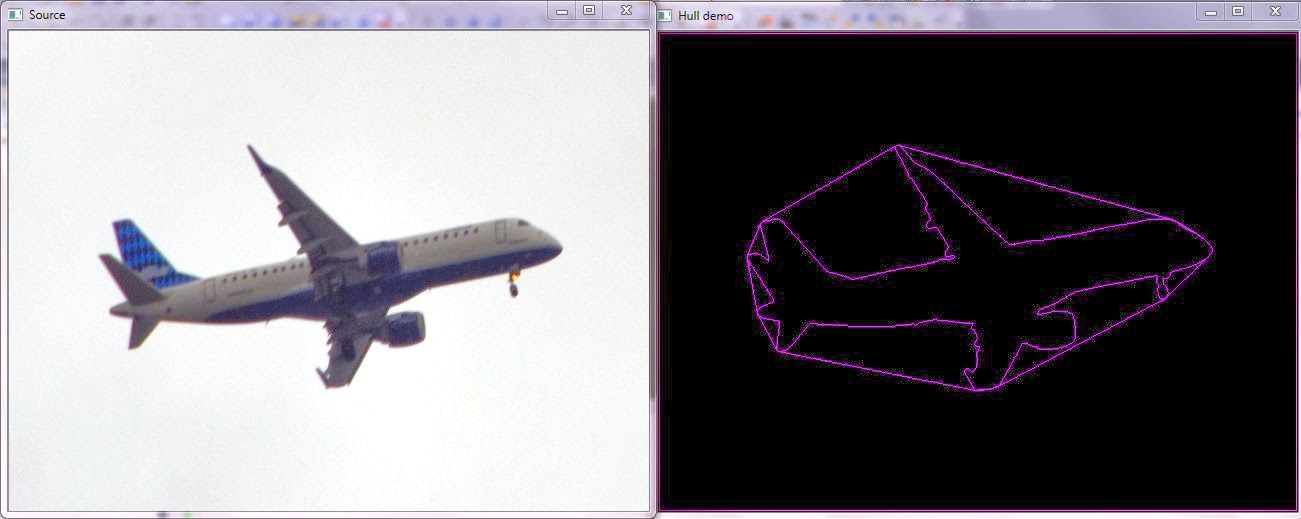
Convex Hull

X is a bounded subset of the plane, the convex hull may be visualized as the shape formed by a rubber band stretched around X.
The convex hull of a set X of points in the Euclidean plane is the smallest convex set that contains X. when
Formally, the convex hull may be defined as the intersection of all convex sets containing X or as the set of all convex combinations of points in X.
A set of points is defined to be convex if it contains the line segments connecting each pair of its points. The convex hull of a given set X may be defined as
  1. The (unique) minimal convex set containing X
  2. The intersection of all convex sets containing X
  3. The set of all convex combinations of points in X.

void convexHull(InputArray points, OutputArray hull, bool clockwise=false, bool returnPoints=true )

Parameters:
  • points – Input 2D point set, stored in std::vector or Mat.
  • hull – Output convex hull. It is either an integer vector of indices or vector of points. In the first case, the hull elements are 0-based indices of the convex hull points in the original array (since the set of convex hull points is a subset of the original point set). In the second case, hull elements are the convex hull points themselves.
  • hull_storage – Output memory storage in the old API (cvConvexHull2 returns a sequence containing the convex hull points or their indices).
  • clockwise – Orientation flag. If it is true, the output convex hull is oriented clockwise. Otherwise, it is oriented counter-clockwise. The assumed coordinate system has its X axis pointing to the right, and its Y axis pointing upwards.
  • orientation – Convex hull orientation parameter in the old API, CV_CLOCKWISE or CV_COUNTERCLOCKWISE.
  • returnPoints – Operation flag. In case of a matrix, when the flag is true, the function returns convex hull points. Otherwise, it returns indices of the convex hull points. When the output array is std::vector, the flag is ignored, and the output depends on the type of the vector: std::vector<int> implies returnPoints=true, std::vector<Point> implies returnPoints=false.
A good example for Convex Hull implementation is provided in OpenCV Documentation. Below code is a modification of the same.

Example:

------------
#include "opencv2/highgui/highgui.hpp"
#include "opencv2/imgproc/imgproc.hpp"
#include <iostream>
#include <stdio.h>
#include <stdlib.h>

using namespace cv;
using namespace std;

int main( int argc, char** argv )
{
 Mat src; Mat src_gray;
 src = imread( "airplane1.jpg", 1 );
 resize(src, src, Size(640,480), 0, 0, INTER_CUBIC);
 cvtColor( src, src_gray, CV_BGR2GRAY );
 blur( src_gray, src_gray, Size(3,3) ); 
 namedWindow( "Source", CV_WINDOW_AUTOSIZE );
 imshow( "Source", src );


 // Convex Hull implementation
 Mat src_copy = src.clone();
 Mat threshold_output;
 vector<vector<Point> > contours;
 vector<Vec4i> hierarchy;

 // Find contours
 threshold( src_gray, threshold_output, 200, 255, THRESH_BINARY );
 findContours( threshold_output, contours, hierarchy, CV_RETR_TREE, CV_CHAIN_APPROX_SIMPLE, Point(0, 0) );

 // Find the convex hull object for each contour
 vector<vector<Point> >hull( contours.size() );
 for( int i = 0; i < contours.size(); i++ )
 {  convexHull( Mat(contours[i]), hull[i], false ); }

 // Draw contours + hull results
 RNG rng;
 Mat drawing = Mat::zeros( threshold_output.size(), CV_8UC3 );
 for( int i = 0; i< contours.size(); i++ )
 {
  Scalar color = Scalar( rng.uniform(0, 255), rng.uniform(0,255), rng.uniform(0,255) );
  drawContours( drawing, contours, i, color, 1, 8, vector<Vec4i>(), 0, Point() );
  drawContours( drawing, hull, i, color, 1, 8, vector<Vec4i>(), 0, Point() );
 }

 // Show in a window
 namedWindow( "Hull demo", CV_WINDOW_AUTOSIZE );
 imshow( "Hull demo", drawing );

 waitKey(0);
 return(0);
}
------------

Result:

Sources:
http://en.wikipedia.org/wiki/Convex_hull

2D Convolution / Creating new filter

OpenCV function filter2D is used to create new linear filters.

void filter2D(InputArray src, OutputArray dst, int ddepth, InputArray kernel, Point anchor=Point(-1,-1), double delta=0, int borderType=BORDER_DEFAULT )
Parameters:
  • src – input image.
  • dst – output image of the same size and the same number of channels as src.
  • ddepth – desired depth of the destination image; if it is negative, it will be the same as src.depth(); the following combinations of src.depth() and ddepth are supported:
    • src.depth() = CV_8U, ddepth = -1/CV_16S/CV_32F/CV_64F
    • src.depth() = CV_16U/CV_16S, ddepth = -1/CV_32F/CV_64F
    • src.depth() = CV_32F, ddepth = -1/CV_32F/CV_64F
    • src.depth() = CV_64F, ddepth = -1/CV_64F
    when ddepth=-1, the output image will have the same depth as the source.
  • kernel – convolution kernel (or rather a correlation kernel), a single-channel floating point matrix; if you want to apply different kernels to different channels, process them individually.
  • anchor – anchor of the kernel that indicates the relative position of a filtered point within the kernel; the anchor should lie within the kernel; default value (-1,-1) means that the anchor is at the kernel center.
  • delta – optional value added to the filtered pixels before storing them in dst.
  • borderType – pixel extrapolation method (see borderInterpolate() for details).
A kernel is a fixed size array of numerical coefficients along with an anchor point in that array.

The code provided below is slight modification of code provided in OpenCV documentation.

Steps:

  1. Load image
  2. Create a kernel to convolve with the input matrix ( here all elements of kernel is equal; so performs a low pass filter operation)
  3. Apply convolution (filter2D)
  4. Draw contours

Functions:


Example:

-------------
#include "opencv2/imgproc/imgproc.hpp"
#include "opencv2/highgui/highgui.hpp"
#include <stdlib.h>
#include <stdio.h>

using namespace cv;

void conv2(Mat src, int kernel_size)
{
    Mat dst,kernel;
    kernel = Mat::ones( kernel_size, kernel_size, CV_32F )/ (float)(kernel_size*kernel_size);

    /// Apply filter
    filter2D(src, dst, -1 , kernel, Point( -1, -1 ), 0, BORDER_DEFAULT );
    namedWindow( "filter2D Demo", CV_WINDOW_AUTOSIZE );imshow( "filter2D Demo", dst );
}

int main ( int argc, char** argv )
{
    Mat src;

    /// Load an image
    src = imread( "1.jpg" );
    if( !src.data )  { return -1; }

    conv2(src,3);

    waitKey(0);
    return 0;
}
-------------

Basic drawing examples

Drawing a line

void line(Mat& img, Point pt1, Point pt2, const Scalar& color, int thickness=1, int lineType=8, int shift=0)
 Parameters:
  • img – Image.
  • pt1 – First point of the line segment.
  • pt2 – Second point of the line segment.
  • color – Line color.
  • thickness – Line thickness.
  • lineType – Type of the line:
    • 8 (or omitted) - 8-connected line.
    • 4 - 4-connected line.
    • CV_AA - antialiased line.
  • shift – Number of fractional bits in the point coordinates.

Example 1: Drawing a line

-------------
#include <opencv2/core/core.hpp>
#include <opencv2/highgui/highgui.hpp>
using namespace cv;

int main( )
{    
  // Create black empty images
  Mat image = Mat::zeros( 400, 400, CV_8UC3 );
  
  // Draw a line 
  line( image, Point( 15, 20 ), Point( 70, 50), Scalar( 110, 220, 0 ),  2, 8 );
  imshow("Image",image);

  waitKey( 0 );
  return(0);
}
-------------

Drawing a Circle

void circle(Mat& img, Point center, int radius, const Scalar& color, int thickness=1, int lineType=8, int shift=0)
Parameters:
  • img – Image where the circle is drawn.
  • center – Center of the circle.
  • radius – Radius of the circle.
  • color – Circle color.
  • thickness – Thickness of the circle outline, if positive. Negative thickness means that a filled circle is to be drawn.
  • lineType – Type of the circle boundary. See the line() description.
  • shift – Number of fractional bits in the coordinates of the center and in the radius value.
The function circle draws a simple or filled circle with a given center and radius.

Example 2: Drawing a Circle

-------------
#include <opencv2/core/core.hpp>
#include <opencv2/highgui/highgui.hpp>
using namespace cv;

int main( )
{    
  // Create black empty images
  Mat image = Mat::zeros( 400, 400, CV_8UC3 );
  
  // Draw a circle 
  circle( image, Point( 200, 200 ), 32.0, Scalar( 0, 0, 255 ), 1, 8 );
  imshow("Image",image);

  waitKey( 0 );
  return(0);
}
-------------

Drawing an Ellipse

void ellipse(Mat& img, Point center, Size axes, double angle, double startAngle, double endAngle, const Scalar& color, int thickness=1, int lineType=8, int shift=0)
Parameters:
  • img – Image.
  • center – Center of the ellipse.
  • axes – Length of the ellipse axes.
  • angle – Ellipse rotation angle in degrees.
  • startAngle – Starting angle of the elliptic arc in degrees.
  • endAngle – Ending angle of the elliptic arc in degrees.
  • box – Alternative ellipse representation via RotatedRect or CvBox2D. This means that the function draws an ellipse inscribed in the rotated rectangle.
  • color – Ellipse color.
  • thickness – Thickness of the ellipse arc outline, if positive. Otherwise, this indicates that a filled ellipse sector is to be drawn.
  • lineType – Type of the ellipse boundary. See the line() description.
  • shift – Number of fractional bits in the coordinates of the center and values of axes.
The functions ellipse with less parameters draw an ellipse outline, a filled ellipse, an elliptic arc, or a filled ellipse sector. A piecewise-linear curve is used to approximate the elliptic arc boundary.

If you use the first variant of the function and want to draw the whole ellipse, not an arc, pass startAngle=0 and endAngle=360.

Example 3: Drawing an Ellipse

-------------
#include <opencv2/core/core.hpp>
#include <opencv2/highgui/highgui.hpp>
using namespace cv;

int main( )
{    
  // Create black empty images
  Mat image = Mat::zeros( 400, 400, CV_8UC3 );
  
  // Draw a ellipse 
  ellipse( image, Point( 200, 200 ), Size( 100.0, 160.0 ), 45, 0, 360, Scalar( 255, 0, 0 ), 1, 8 );
  ellipse( image, Point( 200, 200 ), Size( 100.0, 160.0 ), 135, 0, 360, Scalar( 255, 0, 0 ), 10, 8 );
  ellipse( image, Point( 200, 200 ), Size( 150.0, 50.0 ), 135, 0, 360, Scalar( 0, 255, 0 ), 1, 8 );
  imshow("Image",image);

  waitKey( 0 );
  return(0);
}
-------------

Drawing a Rectangle

void rectangle(Mat& img, Point pt1, Point pt2, const Scalar& color, int thickness=1, int lineType=8, int shift=0)
Parameters:
  • img – Image.
  • pt1 – Vertex of the rectangle.
  • pt2 – Vertex of the rectangle opposite to pt1 .
  • rec – Alternative specification of the drawn rectangle.
  • colorRectangle color or brightness (grayscale image).
  • thickness – Thickness of lines that make up the rectangle. Negative values, like CV_FILLED , mean that the function has to draw a filled rectangle.
  • lineType – Type of the line. See the line() description.
  • shift – Number of fractional bits in the point coordinates.

Example 4: Drawing a Rectangle

-------------
#include <opencv2/core/core.hpp>
#include <opencv2/highgui/highgui.hpp>
using namespace cv;

int main( )
{    
  // Create black empty images
  Mat image = Mat::zeros( 400, 400, CV_8UC3 );
  
  // Draw a rectangle ( 5th argument is not -ve)
  rectangle( image, Point( 15, 20 ), Point( 70, 50), Scalar( 0, 55, 255 ), +1, 4 );
  imshow("Image1",image);
  // Draw a filled rectangle ( 5th argument is -ve)
  rectangle( image, Point( 115, 120 ), Point( 170, 150), Scalar( 100, 155, 25 ), -1, 8 );
  imshow("Image2",image);

  waitKey( 0 );
  return(0);
}
-------------

Drawing a Filled Polygon

void fillPoly(Mat& img, const Point** pts, const int* npts, int ncontours, const Scalar& color, int lineType=8, int shift=0, Point offset=Point() )
Parameters:
  • img – Image.
  • pts – Array of polygons where each polygon is represented as an array of points.
  • npts – Array of polygon vertex counters.
  • ncontours – Number of contours that bind the filled region.
  • color – Polygon color.
  • lineType – Type of the polygon boundaries. See the line() description.
  • shift – Number of fractional bits in the vertex coordinates.
  • offset – Optional offset of all points of the contours.
The function fillPoly fills an area bounded by several polygonal contours. The function can fill complex areas, for example, areas with holes, contours with self-intersections (some of their parts), and so forth.

Example 4: Drawing a Filled Polygon

-------------
#include <opencv2/core/core.hpp>
#include <opencv2/highgui/highgui.hpp>
using namespace cv;

int main( )
{    
  // Create black empty images
  Mat image = Mat::zeros( 400, 400, CV_8UC3 );
  
  int w=400;
  // Draw a circle 
  /** Create some points */
  Point rook_points[1][20];
  rook_points[0][0] = Point( w/4.0, 7*w/8.0 );
  rook_points[0][1] = Point( 3*w/4.0, 7*w/8.0 );
  rook_points[0][2] = Point( 3*w/4.0, 13*w/16.0 );
  rook_points[0][3] = Point( 11*w/16.0, 13*w/16.0 );
  rook_points[0][4] = Point( 19*w/32.0, 3*w/8.0 );
  rook_points[0][5] = Point( 3*w/4.0, 3*w/8.0 );
  rook_points[0][6] = Point( 3*w/4.0, w/8.0 );
  rook_points[0][7] = Point( 26*w/40.0, w/8.0 );
  rook_points[0][8] = Point( 26*w/40.0, w/4.0 );
  rook_points[0][9] = Point( 22*w/40.0, w/4.0 );
  rook_points[0][10] = Point( 22*w/40.0, w/8.0 );
  rook_points[0][11] = Point( 18*w/40.0, w/8.0 );
  rook_points[0][12] = Point( 18*w/40.0, w/4.0 );
  rook_points[0][13] = Point( 14*w/40.0, w/4.0 );
  rook_points[0][14] = Point( 14*w/40.0, w/8.0 );
  rook_points[0][15] = Point( w/4.0, w/8.0 );
  rook_points[0][16] = Point( w/4.0, 3*w/8.0 );
  rook_points[0][17] = Point( 13*w/32.0, 3*w/8.0 );
  rook_points[0][18] = Point( 5*w/16.0, 13*w/16.0 );
  rook_points[0][19] = Point( w/4.0, 13*w/16.0) ;

  const Point* ppt[1] = { rook_points[0] };
  int npt[] = { 20 };

  fillPoly( image, ppt, npt, 1, Scalar( 255, 255, 255 ), 8 );
  imshow("Image",image);

  waitKey( 0 );
  return(0);
}
-------------

Putting Text in image

putText renders the specified text string in the image.

void putText(Mat& img, const string& text, Point org, int fontFace, double fontScale, Scalar color, int thickness=1, int lineType=8, bool bottomLeftOrigin=false )
Parameters:
  • img – Image.
  • text – Text string to be drawn.
  • org – Bottom-left corner of the text string in the image.
  • fontFace – Font type. One of FONT_HERSHEY_SIMPLEX, FONT_HERSHEY_PLAIN, FONT_HERSHEY_DUPLEX, FONT_HERSHEY_COMPLEX, FONT_HERSHEY_TRIPLEX, FONT_HERSHEY_COMPLEX_SMALL, FONT_HERSHEY_SCRIPT_SIMPLEX, or FONT_HERSHEY_SCRIPT_COMPLEX, where each of the font ID’s can be combined with FONT_HERSHEY_ITALIC to get the slanted letters.
  • fontScale – Font scale factor that is multiplied by the font-specific base size.
  • color – Text color.
  • thickness – Thickness of the lines used to draw a text.
  • lineType – Line type. See the line for details.
  • bottomLeftOrigin – When true, the image data origin is at the bottom-left corner. Otherwise, it is at the top-left corner.

Example 5: Putting Text in image

-------------
#include <opencv2/core/core.hpp>
#include <opencv2/highgui/highgui.hpp>
using namespace cv;

int main( )
{ 
  // Create black empty images
  Mat image = Mat::zeros( 400, 400, CV_8UC3 );
  
  putText(image, "Hi all...", Point(50,100), FONT_HERSHEY_SIMPLEX, 1, Scalar(0,200,200), 4);
  imshow("Image",image);

  waitKey( 0 );
  return(0);
}
-------------

Source:
http://docs.opencv.org/modules/core/doc/drawing_functions.html?highlight=rectangle#void%20line%28Mat&%20img,%20Point%20pt1,%20Point%20pt2,%20const%20Scalar&%20color,%20int%20thickness,%20int%20lineType,%20int%20shift%29

Face Detection using Haar-Cascade Classifier

class CascadeClassifier - Cascade classifier class for object detection

CascadeClassifier::CascadeClassifier(const string& filename) // Constructor - Loads a classifier from a file
CascadeClassifier face_cascade( "C:/OpenCV243/data/Haarcascades/haarcascade_frontalface_alt2.xml" );

bool CascadeClassifier::empty() const // Checks whether the classifier has been loaded.bool CascadeClassifier::load(const string& filename) // Loads a classifier from a file
CascadeClassifier face_cascade;
face_cascade.load( "C:/OpenCV243/data/Haarcascades/haarcascade_frontalface_alt2.xml" ); 

bool CascadeClassifier::read(const FileNode& node) // Reads a classifier from a FileStorage node


void CascadeClassifier::detectMultiScale(const Mat& image, vector<Rect>& objects, double scaleFactor=1.1, int minNeighbors=3, int flags=0, Size minSize=Size(), Size maxSize=Size())
// Detects objects of different sizes in the input image.
// The detected objects are returned as a list of rectangles.

Parameters:   
  • cascade – Haar classifier cascade (OpenCV 1.x API only). It can be loaded from XML or YAML file using Load(). When the cascade is not needed anymore, release it using cvReleaseHaarClassifierCascade(&cascade).
  • image – Matrix of the type CV_8U containing an image where objects are detected.
  • objects – Vector of rectangles where each rectangle contains the detected object.
  • scaleFactor – Parameter specifying how much the image size is reduced at each image scale.
  • minNeighbors – Parameter specifying how many neighbors each candidate rectangle should have to retain it.
  • flags – Parameter with the same meaning for an old cascade as in the function cvHaarDetectObjects. It is not used for a new cascade.
  • minSize – Minimum possible object size. Objects smaller than that are ignored.
  • maxSize – Maximum possible object size. Objects larger than that are ignored.
bool CascadeClassifier::setImage(Ptr<FeatureEvaluator>& feval, const Mat& image)
// Sets an image for detection
Parameters:
  • cascade – Haar classifier cascade (OpenCV 1.x API only). See CascadeClassifier::detectMultiScale() for more information.
  • feval – Pointer to the feature evaluator used for computing features.
  • image – Matrix of the type CV_8UC1 containing an image where the features are computed
int CascadeClassifier::runAt(Ptr<FeatureEvaluator>& feval, Point pt, double& weight)
// Runs the detector at the specified point. The function returns 1 if the cascade classifier detects an object in the given location. Otherwise, it returns negated index of the stage at which the candidate has been rejected.
Parameters:
  • cascade – Haar classifier cascade (OpenCV 1.x API only). See CascadeClassifier::detectMultiScale() for more information.
  • feval – Feature evaluator used for computing features.
  • pt – Upper left point of the window where the features are computed. Size of the window is equal to the size of training images.

Steps:

  1. Read the image.
  2. Load Face cascade (CascadeClassifier > load)
  3. Detect faces (detectMultiScale)
  4. Draw circles on the detected faces (ellipse)
  5. Show the result.

Functions:


Example:

------------
#include "opencv2/objdetect/objdetect.hpp"
#include "opencv2/highgui/highgui.hpp"
#include "opencv2/imgproc/imgproc.hpp"

#include <iostream>
#include <stdio.h>

using namespace std;
using namespace cv;

int main( )
{
    Mat image;
    image = imread("lena.jpg", CV_LOAD_IMAGE_COLOR);  
    namedWindow( "window1", 1 );   imshow( "window1", image );

    // Load Face cascade (.xml file)
    CascadeClassifier face_cascade;
    face_cascade.load( "C:/OpenCV243/data/Haarcascades/haarcascade_frontalface_alt2.xml" );

    // Detect faces
    std::vector<Rect> faces;
    face_cascade.detectMultiScale( image, faces, 1.1, 2, 0|CV_HAAR_SCALE_IMAGE, Size(30, 30) );

    // Draw circles on the detected faces
    for( int i = 0; i < faces.size(); i++ )
    {
        Point center( faces[i].x + faces[i].width*0.5, faces[i].y + faces[i].height*0.5 );
        ellipse( image, center, Size( faces[i].width*0.5, faces[i].height*0.5), 0, 0, 360, Scalar( 255, 0, 255 ), 4, 8, 0 );
    }
    
    imshow( "Detected Face", image );
    
    waitKey(0);                   
    return 0;
}
------------

Capture Video from Camera

class VideoCapture - Class for video capturing from video files or cameras.

bool VideoCapture::open(const string& filename) // filename – name of the opened video file
bool VideoCapture::open(int device) // device – id of the opened video capturing device (i.e. a camera index)
bool VideoCapture::isOpened() // Returns true if video capturing has been initialized already
void VideoCapture::release() // Closes video file or capturing device
bool VideoCapture::grab() // Grabs the next frame from video file or capturing device
bool VideoCapture::retrieve(Mat& image, int channel=0) // Decodes and returns the grabbed video frame
The primary use of the function is in multi-camera environments, especially when the cameras do not have hardware synchronization. That is, you call VideoCapture::grab() for each camera and after that call the slower method VideoCapture::retrieve() to decode and get frame from each camera. This way the overhead on demosaicing or motion jpeg decompression etc. is eliminated and the retrieved frames from different cameras will be closer in time.
VideoCapture& VideoCapture::(operator)>>(Mat& image) // Grabs, decodes and returns the next video frame
double VideoCapture::get(int propId) // Returns the specified VideoCapture property
Parameters: 
       propId – Property identifier. It can be one of the following:
  • CV_CAP_PROP_POS_MSEC Current position of the video file in milliseconds or video capture timestamp.
  • CV_CAP_PROP_POS_FRAMES 0-based index of the frame to be decoded/captured next.
  • CV_CAP_PROP_POS_AVI_RATIO Relative position of the video file: 0 - start of the film, 1 - end of the film.
  • CV_CAP_PROP_FRAME_WIDTH Width of the frames in the video stream.
  • CV_CAP_PROP_FRAME_HEIGHT Height of the frames in the video stream.
  • CV_CAP_PROP_FPS Frame rate.
  • CV_CAP_PROP_FOURCC 4-character code of codec.
  • CV_CAP_PROP_FRAME_COUNT Number of frames in the video file.
  • CV_CAP_PROP_FORMAT Format of the Mat objects returned by retrieve() .
  • CV_CAP_PROP_MODE Backend-specific value indicating the current capture mode.
  • CV_CAP_PROP_BRIGHTNESS Brightness of the image (only for cameras).
  • CV_CAP_PROP_CONTRAST Contrast of the image (only for cameras).
  • CV_CAP_PROP_SATURATION Saturation of the image (only for cameras).
  • CV_CAP_PROP_HUE Hue of the image (only for cameras).
  • CV_CAP_PROP_GAIN Gain of the image (only for cameras).
  • CV_CAP_PROP_EXPOSURE Exposure (only for cameras).
  • CV_CAP_PROP_CONVERT_RGB Boolean flags indicating whether images should be converted to RGB.
  • CV_CAP_PROP_WHITE_BALANCE Currently not supported
  • CV_CAP_PROP_RECTIFICATION Rectification flag for stereo cameras (note: only supported by DC1394 v 2.x backend currently)

bool VideoCapture::set(int propId, double value) // Sets a property in the VideoCapture

Parameters:
  • propId
    • CV_CAP_PROP_POS_MSEC Current position of the video file in milliseconds.
    • CV_CAP_PROP_POS_FRAMES 0-based index of the frame to be decoded/captured next.
    • CV_CAP_PROP_POS_AVI_RATIO Relative position of the video file: 0 - start of the film, 1 - end of the film.
    • CV_CAP_PROP_FRAME_WIDTH Width of the frames in the video stream.
    • CV_CAP_PROP_FRAME_HEIGHT Height of the frames in the video stream.
    • CV_CAP_PROP_FPS Frame rate.
    • CV_CAP_PROP_FOURCC 4-character code of codec.
    • CV_CAP_PROP_FRAME_COUNT Number of frames in the video file.
    • CV_CAP_PROP_FORMAT Format of the Mat objects returned by retrieve() .
    • CV_CAP_PROP_MODE Backend-specific value indicating the current capture mode.
    • CV_CAP_PROP_BRIGHTNESS Brightness of the image (only for cameras).
    • CV_CAP_PROP_CONTRAST Contrast of the image (only for cameras).
    • CV_CAP_PROP_SATURATION Saturation of the image (only for cameras).
    • CV_CAP_PROP_HUE Hue of the image (only for cameras).
    • CV_CAP_PROP_GAIN Gain of the image (only for cameras).
    • CV_CAP_PROP_EXPOSURE Exposure (only for cameras).
    • CV_CAP_PROP_CONVERT_RGB Boolean flags indicating whether images should be converted to RGB.
    • CV_CAP_PROP_WHITE_BALANCE Currently unsupported
    • CV_CAP_PROP_RECTIFICATION Rectification flag for stereo cameras (note: only supported by DC1394 v 2.x backend currently)
  • value – Value of the property.

Example 1:

-----------
#include "opencv2/opencv.hpp"
using namespace cv;

int main(int, char**)
{
    VideoCapture cap(0); // open the default camera
    if(!cap.isOpened())  // check if we succeeded
        return -1;

    namedWindow("Video",1);
    while(1)
    {
        Mat frame;
        cap >> frame;         // get a new frame from camera
        imshow("Video", frame);

        // Press 'c' to escape
        if(waitKey(30) == 'c') break;
    }
    return 0;
}
-----------

Example 2:

-----------
#include "opencv2/objdetect/objdetect.hpp"
#include "opencv2/highgui/highgui.hpp"
#include "opencv2/imgproc/imgproc.hpp"
using namespace cv;

int main( int argc, const char** argv )
{
    CvCapture* capture;
    Mat frame;
    
    // Read the video stream
    capture = cvCaptureFromCAM( -1 );
    namedWindow("Video",CV_WINDOW_AUTOSIZE);
    if( capture )
    {
        while( true )
        {
            frame = cvQueryFrame( capture );
            imshow("Video",frame);

            // Press 'c' to escape
            int c = waitKey(10);
            if( (char)c == 'c' ) { break; }
        }
    }
    return 0;
}
-----------

Random number generator (Drawing colorful random lines)

class RNG - Random number generator.


RNG::next - Returns the next random number.
RNG::operator T - Returns the next random number of the specified type.
RNG::operator uchar()
RNG::operator ushort()
RNG::operator int()
RNG::operator unsigned int()
RNG::operator float()
RNG::operator double()
RNG::uniform - Returns the next random number sampled from the uniform distribution.
float RNG::uniform(float a, float b)
double RNG::uniform(double a, double b)
RNG::gaussian - Returns the next random number sampled from the Gaussian distribution.
double RNG::gaussian(double sigma)

RNG::fill - Fills arrays with random numbers.
void RNG::fill(InputOutputArray mat, int distType, InputArray a, InputArray b, bool saturateRange=false )


Example:
------------
RNG rng;

// always produces 0
double a = rng.uniform(0, 1);

// produces double from [0, 1)
double a1 = rng.uniform((double)0, (double)1);

// produces float from [0, 1)
double b = rng.uniform(0.f, 1.f);

// produces double from [0, 1)
double c = rng.uniform(0., 1.);

// may cause compiler error because of ambiguity:
//  RNG::uniform(0, (int)0.999999)? or RNG::uniform((double)0, 0.99999)?
double d = rng.uniform(0, 0.999999);
------------

The code provided below is slight modification of code given in OpenCV documentation.

Example 1: ( Drawing Colorful Random Lines )

-------------
#include "opencv2/highgui/highgui.hpp"
#include "opencv2/imgproc/imgproc.hpp"
#include <iostream>
#include <stdio.h>
#include <stdlib.h>

using namespace cv;
using namespace std;

void Drawing_Random_Lines( Mat image, char* window_name, RNG rng, int NumOfLines, int windowHeight, int windowWidth );
static Scalar randomColor( RNG& rng );

int main( )
{    
    int windowHeight = 480, windowWidth=640;
    Mat image = Mat::zeros( windowHeight, windowWidth, CV_8UC3 );
    namedWindow( "Source", CV_WINDOW_AUTOSIZE );
    int n=1;
    while(1)
    {
    RNG rng(n);
    Drawing_Random_Lines(image, "Source", rng, 5, windowHeight, windowWidth);    
    imshow( "Source", image );
    waitKey(100);
    n++;
    }

    return(0);
}

void Drawing_Random_Lines( Mat image, char* window_name, RNG rng, int NumOfLines, int windowHeight, int windowWidth )
{
    int lineType = 8;
    Point pt1, pt2;

    for( int i = 0; i < NumOfLines; i++ )
    {
        pt1.x = rng.uniform( 0, windowWidth );
        pt1.y = rng.uniform( 0, windowHeight );
        pt2.x = rng.uniform( 0, windowWidth );
        pt2.y = rng.uniform( 0, windowHeight );

        line( image, pt1, pt2, randomColor(rng), rng.uniform(1, 10), 8 );
        imshow( window_name, image );
    }
}

static Scalar randomColor( RNG& rng )
{
    int icolor = (unsigned) rng;
    return Scalar( icolor&255, (icolor>>8)&255, (icolor>>16)&255 );
}
-------------

Example 2: ( Drawing Colorful Random Lines )

-------------
#include "opencv2/highgui/highgui.hpp"
#include "opencv2/imgproc/imgproc.hpp"
#include <iostream>
#include <stdio.h>
#include <stdlib.h>

using namespace cv;
using namespace std;

void Drawing_Random_Lines( Mat image, char* window_name, RNG rng, int NumOfLines, int windowHeight, int windowWidth );
static Scalar randomColor( RNG& rng );

int main( )
{   
    int windowHeight = 480, windowWidth=640;
    Mat image = Mat::zeros( windowHeight, windowWidth, CV_8UC3 );
    namedWindow( "Source", CV_WINDOW_AUTOSIZE );
    int n=1;
    while(1)
    {
    RNG rng(n);
    Drawing_Random_Lines(image, "Source", rng, n, windowHeight, windowWidth);   
    imshow( "Source", image );
    waitKey(100);
    n++;
    }

    return(0);
}

void Drawing_Random_Lines( Mat image, char* window_name, RNG rng, int NumOfLines, int windowHeight, int windowWidth )
{
    int lineType = 8;
    Point pt1, pt2;

    for( int i = 0; i < NumOfLines; i++ )
    {
        pt1.x = rng.uniform( 0, windowWidth );
        pt1.y = rng.uniform( 0, windowHeight );
        pt2.x = rng.uniform( 0, windowWidth );
        pt2.y = rng.uniform( 0, windowHeight );

        line( image, pt1, pt2, randomColor(rng), rng.uniform(1, 10), 8 );
        imshow( window_name, image );
    }
}

static Scalar randomColor( RNG& rng )
{
    int icolor = (unsigned) rng;
    return Scalar( icolor&255, (icolor>>8)&255, (icolor>>16)&255 );
}

-------------

Result:


Adding a Trackbar

int createTrackbar(const string& trackbarname, const string& winname, int* value, int count, TrackbarCallback onChange=0, void* userdata=0)

Parameters:
  • trackbarname – Name of the created trackbar.
  • winname – Name of the window that will be used as a parent of the created trackbar.
  • value – Optional pointer to an integer variable whose value reflects the position of the slider. Upon creation, the slider position is defined by this variable.
  • count – Maximal position of the slider. The minimal position is always 0.
  • onChange – Pointer to the function to be called every time the slider changes position. This function should be prototyped as void Foo(int,void*); , where the first parameter is the trackbar position and the second parameter is the user data (see the next parameter). If the callback is the NULL pointer, no callbacks are called, but only value is updated.
  • userdata – User data that is passed as is to the callback. It can be used to handle trackbar events without using global variables.
The code provided below is slight modification of code given in OpenCV documentation.

Example:

-------------
#include <opencv/cv.h>
#include <opencv2/highgui/highgui.hpp>

using namespace cv;

/// Global Variables
const int alpha_slider_max = 100;
int alpha_slider;
Mat src1,src2,dst;

void on_trackbar( int, void* )
{
 double alpha;
 double beta;

 alpha = (double) alpha_slider/alpha_slider_max ;
 beta = ( 1.0 - alpha );

 addWeighted( src1, alpha, src2, beta, 0.0, dst);

 imshow( "Linear Blend", dst );
}

int main( )
{
 // Read image ( same size, same type )
 src1 = imread("image2.jpg",0);
 src2 = imread("image1.jpg",0);

 // Create Windows
 namedWindow("Linear Blend", 1);

 // Initialize values
 alpha_slider = 0;
 createTrackbar( "Alpha ", "Linear Blend", &alpha_slider,  alpha_slider_max, on_trackbar );

 // Initialize trackbar
 on_trackbar( 0, 0 );

 waitKey(0);
 return 0;
}
-------------

Fitting rotated boxes and ellipses for contours

RotatedRect fitEllipse(InputArray points)
Fits an ellipse around a set of 2D points.

RotatedRect minAreaRect(InputArray points)
Finds a rotated rectangle of the minimum area enclosing the input 2D point set.

vector<vector<Point>> contours;
findContours( ..., contours, ...); // This will find out the contours and save in contours
cout<<endl<<Mat(contours[index])<<endl; //index = 0,1,2,... used to print the format of contours
ellipse = fitEllipse( Mat(contours[i]) ); // fitting ellipse in contour points
Rect = minAreaRect( Mat(contours[i]) ); 
 
The code provided below is slight modification of code given in OpenCV documentation.

Steps:

  1. Load image
  2. Convert to gray-scale.
  3. Remove noise by blurring with a Gaussian filter
  4. Create new window
  5. Add trackbar to the window
  • Detect Canny edges
  • Find contours
  • Find the rotated rectangles and ellipses for each contour
  • Draw contours, rotated rectangles and ellipses

Functions:


Example:

-----------------
#include "opencv2/imgproc/imgproc.hpp"
#include "opencv2/highgui/highgui.hpp"
#include <stdlib.h>
#include <stdio.h>
#include<iostream>

using namespace cv;
using namespace std;

Mat src; Mat src_gray;
int thresh = 73;
int points = 50;
int max_thresh = 255;
RNG rng(12345);

void thresh_callback(int, void*);

int main( )
{
    /// Load source image and convert it to gray
    src = imread( "1.jpg", 1 );

    /// Convert image to gray and blur it
    cvtColor( src, src_gray, CV_BGR2GRAY );
    blur( src_gray, src_gray, Size(3,3) );

    namedWindow( "Source", CV_WINDOW_AUTOSIZE );    imshow( "Source", src );
    createTrackbar( " Threshold:", "Source", &thresh, max_thresh, thresh_callback );
    
    namedWindow( "Source1", CV_WINDOW_AUTOSIZE );    imshow( "Source1", src );
    createTrackbar( " Threshold:", "Source1", &points, max_thresh, thresh_callback );

    thresh_callback(0,0);

    waitKey(0);
    return(0);
}

void thresh_callback( int, void*)
{
    Mat threshold_output;
    Mat edge;
    vector<vector<Point> > contours;
    vector<Vec4i> hierarchy;

    /// Detect edges     
    Canny( src_gray, edge, thresh, 3*thresh, 3);
    edge.convertTo(threshold_output, CV_8U);

    /// Find contours
    findContours( threshold_output, contours, hierarchy, CV_RETR_TREE, CV_CHAIN_APPROX_SIMPLE, Point(0, 0) );

    /// Find the rotated rectangles and ellipses for each contour
    vector<RotatedRect> minRect( contours.size() );
    vector<RotatedRect> minEllipse( contours.size() );
    
    cout<<endl<<contours[1]<<endl;
    cout<<endl<<Mat(contours[1])<<endl;

    for( int i = 0; i < contours.size(); i++ )
    { minRect[i] = minAreaRect( Mat(contours[i]) );
    if( contours[i].size() > points )
    { minEllipse[i] = fitEllipse( Mat(contours[i]) ); }
    }

    /// Draw contours + rotated rects + ellipses
    Mat drawing = Mat::zeros( threshold_output.size(), CV_8UC3 );
    for( int i = 0; i< contours.size(); i++ )
    {
        Scalar color = Scalar( rng.uniform(0, 255), rng.uniform(0,255), rng.uniform(0,255) );
        // contour
        drawContours( drawing, contours, i, color, 1, 8, vector<Vec4i>(), 0, Point() );
        // ellipse
        ellipse( drawing, minEllipse[i], color, 2, 8 );
        // rotated rectangle
        Point2f rect_points[4]; minRect[i].points( rect_points );
        for( int j = 0; j < 4; j++ )
            line( drawing, rect_points[j], rect_points[(j+1)%4], color, 1, 8 );
    }

    /// Show in a window
    namedWindow( "Contours", CV_WINDOW_AUTOSIZE );
    imshow( "Contours", drawing );
}
-----------------

Result:


Calculating moments of an image

Moments moments(InputArray array, bool binaryImage=false )

Parameters:
  • array – Raster image (single-channel, 8-bit or floating-point 2D array) or an array ( 1xN or Nx1 ) of 2D points (Point or Point2f ).
  • binaryImage – If it is true, all non-zero image pixels are treated as 1’s. The parameter is used for images only.
  • moments – Output moments.
The function computes moments, up to the 3rd order, of a vector shape or a rasterized shape. The results are returned in the structure Moments defined as:
class Moments
{
public:
    Moments();
    Moments(double m00, double m10, double m01, double m20, double m11,
            double m02, double m30, double m21, double m12, double m03 );
    Moments( const CvMoments& moments );
    operator CvMoments() const;

    // spatial moments
    double  m00, m10, m01, m20, m11, m02, m30, m21, m12, m03;
    // central moments
    double  mu20, mu11, mu02, mu30, mu21, mu12, mu03;
    // central normalized moments
    double  nu20, nu11, nu02, nu30, nu21, nu12, nu03;
}
In case of a raster image, the spatial moments Moments:: mji are computed as:
\texttt{m} _{ji}= \sum _{x,y}  \left ( \texttt{array} (x,y)  \cdot x^j  \cdot y^i \right )
The central moments \texttt{Moments::mu}_{ji} are computed as:
\texttt{mu} _{ji}= \sum _{x,y}  \left ( \texttt{array} (x,y)  \cdot (x -  \bar{x} )^j  \cdot (y -  \bar{y} )^i \right )
where (\bar{x}, \bar{y}) is the mass center:
\bar{x} = \frac{\texttt{m}_{10}}{\texttt{m}_{00}} , \; \bar{y} = \frac{\texttt{m}_{01}}{\texttt{m}_{00}}
The normalized central moments Moments:: nuji are computed as:
\texttt{nu} _{ji}= \frac{\texttt{mu}_{ji}}{\texttt{m}_{00}^{(i+j)/2+1}} .
The code provided below is slight modification of code given in OpenCV documentation.

Steps:

  1. Load image
  2. Convert to gray-scale.
  3. Remove noise by blurring with a Gaussian filter
  4. Detect edges using canny
  5. Find contours (findContours)
  6. Get the moments(Moments)
  7. Draw contours 
  8. Calculate the area with the moments 00 and compare with the result of the OpenCV function

Functions:


Example:

-------------
#include "opencv2/highgui/highgui.hpp"
#include "opencv2/imgproc/imgproc.hpp"
#include <iostream>
#include <stdio.h>
#include <stdlib.h>

using namespace cv;
using namespace std;


RNG rng(12345);

void find_moments( Mat src );

int main( )
{
    /// Load source image, convert it to gray and blur it
    Mat src, gray;;
    src = imread("shapes.jpg", 1 );
    cvtColor( src, gray, CV_BGR2GRAY );
    blur( gray, gray, Size(3,3) );

    namedWindow( "Source", CV_WINDOW_AUTOSIZE );
    imshow( "Source", src );

    find_moments( gray );

    waitKey(0);
    return(0);
}

void find_moments( Mat gray )
{
    Mat canny_output;
    vector<vector<Point> > contours;
    vector<Vec4i> hierarchy;

    /// Detect edges using canny
    Canny( gray, canny_output, 50, 150, 3 );
    /// Find contours
    findContours( canny_output, contours, hierarchy, CV_RETR_TREE, CV_CHAIN_APPROX_SIMPLE, Point(0, 0) );

    /// Get the moments
    vector<Moments> mu(contours.size() );
    for( int i = 0; i < contours.size(); i++ )
    { mu[i] = moments( contours[i], false ); }

    ///  Get the mass centers:
    vector<Point2f> mc( contours.size() );
    for( int i = 0; i < contours.size(); i++ )
    { mc[i] = Point2f( mu[i].m10/mu[i].m00 , mu[i].m01/mu[i].m00 ); }

    /// Draw contours
    Mat drawing = Mat::zeros( canny_output.size(), CV_8UC3 );
    for( int i = 0; i< contours.size(); i++ )
    {
        Scalar color = Scalar( rng.uniform(0, 255), rng.uniform(0,255), rng.uniform(0,255) );
        drawContours( drawing, contours, i, color, 2, 8, hierarchy, 0, Point() );
        circle( drawing, mc[i], 4, color, -1, 8, 0 );
    }

    /// Show in a window
    namedWindow( "Contours", CV_WINDOW_AUTOSIZE );
    imshow( "Contours", drawing );

    /// Calculate the area with the moments 00 and compare with the result of the OpenCV function
    printf("\t Info: Area and Contour Length \n");
    for( int i = 0; i< contours.size(); i++ )
        printf(" * Contour[%d] - Area (M_00) = %.2f - Area OpenCV: %.2f - Length: %.2f \n", i, mu[i].m00, contourArea(contours[i]), arcLength( contours[i], true ) );

}
-------------

Draw circles at specific coordinates of a zero matrix

void randu (InputOutputArray dst, InputArray low, InputArray high)
Generates a single uniformly-distributed random number or an array of random numbers.

Parameters:
  • dst – output array of random numbers; the array must be pre-allocated.
  • low – inclusive lower boundary of the generated random numbers.
  • high – exclusive upper boundary of the generated random numbers.

This is a program to draw circles at specific positions of a zero matrix.

Steps:

  1. Get some random coordinates (matrix R with 15 points)
  2. Create a zero matrix
  3. Circle at each position
  4. Show the result

Functions:


Example:

--------------
#include "opencv2/imgproc/imgproc.hpp"
#include "opencv2/highgui/highgui.hpp"
#include<iostream>

using namespace cv;
using namespace std;

int main( int argc, char** argv )
{
    Mat R = Mat(15, 2, CV_32FC1);
    randu(R, Scalar(0), Scalar(255));
    cout << "R = " << endl << " " << R << endl << endl; 

    Mat Z = Mat::zeros(300,300, CV_8UC3);

    for(int i=0;i<15;i++)
    {
        circle( Z, Point( R.at<float>(i, 0), R.at<float>(i, 1) ), 5,  Scalar(255,0,255), 2, 8, 0 );
    }
    imshow("zeros2",Z);

    waitKey(0);
    return 0;
}
--------------